Download the App and manage your eSIMs easily
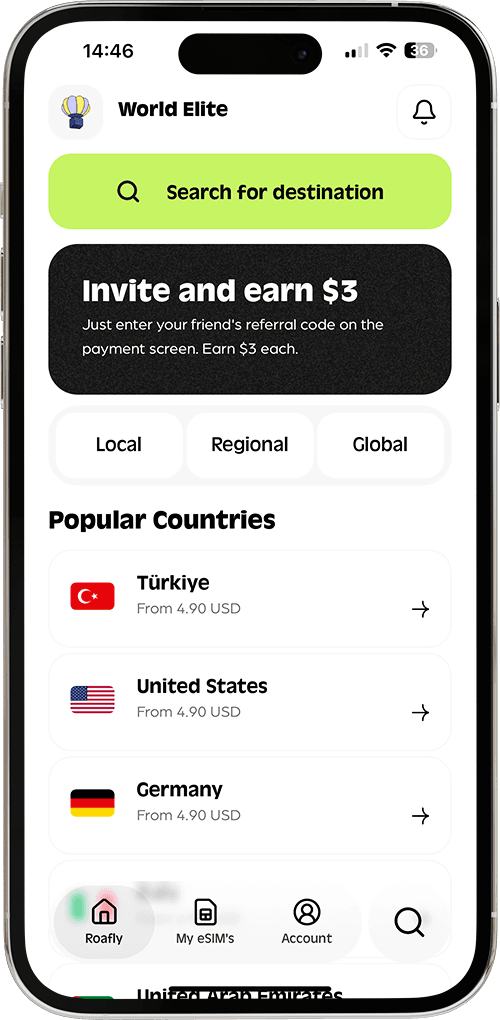
Create your order quickly
See your eSIM details
Track your remaining data
Download the App and manage your eSIMs easily
Create your order quickly
See your eSIM details
Track your remaining data
Using maps in Marrakech, messaging your riad and checking onward transport is simplest with mobile data already arranged. We would choose a prepaid travel eSIM for a short Morocco trip with a compatible phone, then use accommodation Wi-Fi for larger downloads. Local prepaid SIMs deserve a closer look if you need a Moroccan number or want lower data costs and can arrange registration after arrival.
Orange Morocco
Instant delivery
4.00 USD From 3.60 USD

Ethan Brooks
Updated Sep 10, 2026
8 min read

Jump to section
👇Best for most trips
Orange Morocco

Morocco
10 GB · 30 days
Enough for maps, bookings and everyday travel.
Hotspot supported
$19.90
$17.91
SAHARA10 automatically applied
$4.00From 3.60 USD
10% reader discount
Start with your existing mobile plan. If it explicitly includes enough data in Morocco at no extra cost, roaming may cover your trip without another purchase. Otherwise, compare the options below by total cost and how you will use them.
| Option | Cost to compare | Best for | Main trade-off |
|---|---|---|---|
| Travel eSIM | Prepaid data package | Preparing before departure and keeping your usual SIM installed | Requires a compatible, unlocked phone; check whether calls are included |
| Local prepaid SIM | SIM or starter pack plus the data you need | Local calls and potentially lower data costs | Registration and choosing the right bundle |
| Home-provider roaming | Included allowance, travel pass or usage charges | A plan that already covers Morocco, or a very short visit | Morocco must be included by name in your tariff |
| Accommodation and café Wi-Fi | Venue terms or accommodation inclusion | Downloads and internet use during stops | Leaves you without that connection once you leave |
| Pocket Wi-Fi | Rental, possible delivery and a refundable deposit | Several devices travelling together | Charging, collection, return and staying near the router |
Mobile data is particularly useful between the airport and your accommodation. Save your riad's location and arrival instructions before departure, even if you have already arranged a connection.
Buying your data before departure removes a task from arrival day. Check that your exact phone model supports eSIM and that it is carrier-unlocked before paying; support can vary between regional versions of the same handset.
Roafly's Morocco eSIM plans use Orange Morocco and provide data-only service, without a local phone number or a calls/SMS allowance. Hotspot use comes from your purchased data allowance, with no separate hotspot quota, and top-ups are supported.
Choose the perfect data plan for your trip
Exclusive Reader Bonus!
Enjoy an extra %10 OFF your first Roafly eSIM purchase as a thank you for reading.
Your existing WhatsApp account can continue to use its usual number over the data connection. Calling an ordinary Moroccan phone number is a different requirement: use a suitable calling service, a local voice plan or your home line under its roaming terms.
Keep setup straightforward:
Install the eSIM over reliable Wi-Fi before departure, following the supplied instructions.
In Morocco, select the travel eSIM for mobile data and enable data roaming on that line as instructed.
Keep data roaming off on your home line unless you intend to use its tariff, and disable automatic mobile-data switching where available.
Installation convenience is only one part of the choice. If you still need to compare allowances, networks and providers, compare eSIM options for Morocco before purchasing.

Local prepaid service is worth considering if you need a Moroccan number, expect substantial data use or have an unlocked phone without eSIM support. Ask for a prepaid offer suitable for your stay, with the data allowance, voice credit and expiry explained separately.
Bring your passport. Orange accepts it for prepaid-line identification, and Maroc Telecom's Jawal identification service also supports passports. Have the seller complete registration and demonstrate that mobile data works before you leave.
Compare the full starting cost, rather than treating a recharge price as the price of a working new SIM. During our September 2026 check, Maroc Telecom listed a promotional *20 GB Jawal 3 data recharge for 100 MAD, valid for one month. That is a top-up offer; any SIM or starter-pack cost must be accounted for separately.
The type of recharge matters too. Credit for calls, selected social apps and general internet access may serve different purposes. Ask for a general data allowance if you need maps, bookings, browsing and messaging, and check the confirmation SMS or account balance after purchase.
Local prepaid service can also come as an eSIM. Orange advertises local prepaid eSIMs, although its identification and purchase process still applies. Our guide to buying a tourist SIM in Morocco covers the local buying decision in more detail.
Buying at the airport can make sense when you want help getting connected before your transfer. Waiting until town gives you time to compare offers, but requires an arrival plan that works without mobile data.
Judge the package by its total price, usable data and validity. The words “free SIM” tell you little about the cost of the bundle you must buy with it. If Marrakech is your arrival point, check the guide to SIM cards at Marrakech Airport for the airport-specific options.
Morocco is outside the EU's standard “roam like at home” area. A plan that works at domestic rates in Spain or France does not gain the same treatment in Morocco. Some providers voluntarily include additional destinations, so your own tariff is the deciding factor. The EU explains the distinction in its rules for roaming outside the EU.
Before departure, confirm the Morocco data allowance, the full-trip cost and what happens after the allowance runs out. Check whether a daily pass starts when you use data, make a call or receive one. Keeping your home SIM active for calls and messages can still involve charges even when another SIM handles your data.
If you are taking a ferry from Spain, onboard maritime or satellite service is a separate charging issue. Airplane mode with Wi-Fi enabled is a practical way to avoid connecting to a ship's mobile network. Re-enable your intended mobile connection once ashore.
Accommodation Wi-Fi can take care of downloads, backups and longer laptop sessions. Before booking a riad or hotel for remote work, ask whether the connection reaches your actual room or workspace and whether the property can provide a recent speed test from there.
“Wi-Fi available” does not tell you how well a video meeting will work. Test the connection at your desk when you arrive, and have mobile data available if an important call depends on it. Scheduling a workday at a checked connection is more practical than relying on whichever café you happen to pass.
At cafés and other shared venues, confirm the network name with staff. Avoid entering payment details into unfamiliar connection pages and turn off automatic joining for networks you no longer use.
Treat airport Wi-Fi as a possible backup. Keep your booking confirmation, transfer details and accommodation contact accessible offline so you can continue if a login page or connection is unavailable.
Start with your phone's hotspot if you only need to connect a laptop occasionally. It avoids collecting and returning another device, although sharing uses your mobile data allowance and phone battery.
Pocket Wi-Fi is a real rental option in Marrakech. When checked in September 2026, City WiFi listed €34 for seven days, a €40 refundable deposit and €5 delivery, with free office collection. With delivery, that means €39 in rental and delivery charges plus €40 held as a deposit, subject to the return conditions.
The provider advertises connections for up to ten devices. That can suit a family staying together, but everyone using the router needs to remain within its Wi-Fi range. If two people split up for the day, the person without the router needs another connection.
Ask about usable high-speed data, any fair-use limits, charging and the return arrangement before reserving. The rental's advertised “unlimited” label should not be treated as a promise of unrestricted speed. A route ending outside Marrakech also makes collection and return worth resolving in advance.
Match your preparation to the route. City sightseeing gives you opportunities to return to accommodation or visit a shop if you need help. Before an Atlas excursion or a desert stay, settle the connection questions while you still have time to change your arrangements.
Ask your guide or accommodation about reception at the specific village, lodge or camp you will visit. A connection working in Marrakech or Merzouga does not establish reception along every road or at your overnight stop. Choose a plan with a disclosed network, then check the places where being online actually matters to you.
Download maps while connected, including the areas between overnight stops. Save your riad's map pin, any meeting-point directions and your driver's or host's contact details. Depending on the app and downloaded area, you can search for places and follow routes offline. Live traffic updates and sending messages still require a connection.
Before leaving for the mountain or desert part of your trip:
Download booking details and the next accommodation's arrival instructions.
Charge your phone and power bank, especially if you will use navigation or hotspot.
Check your remaining data and package expiry before the next travel day.
Agree on meeting points and times without relying on last-minute messages.
Move essential work calls to a location where you have checked the connection.
Best for most trips
Orange Morocco
Morocco
10 GB · 30 days
Enough for maps, bookings and everyday travel.
Hotspot supported
$19.90
$17.91
SAHARA10 automatically applied
$4.00From 3.60 USD
10% reader discount

Manage your eSIM in the app
Install, top up and track data.
