



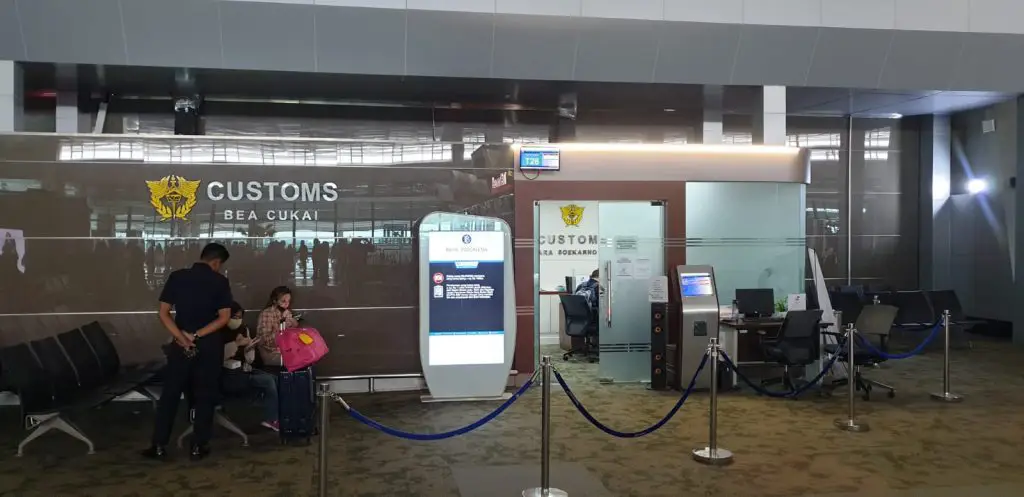
But first, you see a massive queue at the airport. Not for immigration, but for SIM Cards.
Indonesia has some of the strictest mobile phone laws in the world. If you want to use a local SIM card, you must register your phone's IMEI with the government customs database.
Is it worth the hassle? In 2025, the answer is no. Here is how smart travelers are skipping the bureaucracy and getting instantly with eSIMs.
The Problem: Indonesia’s Strict IMEI Law
To stop the black market of imported phones, Indonesia blocks local signals on foreign phones unless they are registered.
If you buy a local physical SIM (Telkomsel/XL):
-
The Queue: You must stand in line at the airport customs area.
-
The Paperwork: You need your passport, boarding pass, and device details.
-
The Risk: If you stay longer than 90 days (or if the rules change, which they often do), you might be asked to pay a 40% import tax on your iPhone's value.
-
Street Vendor Scam: Never buy a pre-registered SIM on the street in Kuta. They often work for 1 day and then get blocked by the government.
The Solution: The "Roaming" Loophole (Roafly eSIM)
This is the secret most travel blogs don't tell you. Because Roafly eSIM operates as a "Roaming" provider (using foreign routing), it is exempt from Indonesian IMEI registration laws.
-
No Customs Declaration: You don't need to register your phone.
-
No Passport Scan: We value your privacy.
-
Instant Activation: You have internet while you are still on the plane taxiing to the gate.
You simply bypass the entire bureaucratic mess. While others are filling out customs forms, you are already in your Grab car on the way to the beach.
Connectivity in Bali: Ubud, Canggu & Nusa Penida
Bali is not just beaches; it's jungles and islands too. You need a network that works everywhere. Roafly connects to the top local infrastructures (like Indosat or XL Axiata), ensuring coverage in key areas:
-
Canggu/Seminyak: Full 4G/LTE speed for digital nomads working from cafes.
-
Ubud: Reliable connection in the rice terraces and monkey forest.
-
Nusa Penida: Even on this rugged island (famous for Kelingking Beach), you stay connected to upload your photos.
Essential Apps You Can’t Live Without in Bali
In Bali, apps are life. You cannot survive without them, and they all need data:
- Gojek / Grab: There is no public transport. You use these apps to summon scooter taxis (Ojek) or order food.
- WhatsApp: Every business, from beach clubs to tour guides, communicates only via WhatsApp.
- Google Maps: Bali's roads are a maze of shortcuts. You need live navigation to avoid traffic jams.
Price Comparison: Is Local Really Cheaper?
A local tourist SIM at the airport is inflated in price, often costing $20 - $30 USD for a "Tourist Pack."
Roafly Indonesia Prices:
-
1GB: Start for just $3.90
-
5GB: Perfect for a 1-week trip.
-
Value: Considering you save 1 hour of holiday time at the airport, the value is unbeatable.
Need data in Indonesia? Get an eSIM!
Choose the perfect data plan for your trip
Does Roafly Work on the Islands? (Nusa Penida & Gili)
This is the most common question we get. Bali isn't just island. Most tourists take a boat to the famous Nusa Penida (for Kelingking Beach) or the Gili Islands (for turtles and partying).
-
The Challenge: These small islands often have poor electricity and spotty signals. Hotel Wi-Fi rarely works well there.
-
The Roafly Advantage: Our eSIM connects to Telkomsel and XL Axiata, which are the providers with reliable towers on these remote islands.
-
Verdict: Yes, you can upload your T-Rex beach selfie instantly from Nusa Penida.
Step-by-Step: How to Activate Your Bali eSIM
Setting up an eSIM is easier than ordering a Nasi Goreng. Do this before you fly to avoid stress.
For iPhone Users:
-
Go to Settings > Cellular > Add eSIM.
-
Scan the QR code sent to your email.
-
Label the new plan as "Bali" or "Roafly".
-
Important: Switch "Mobile Data" to "Roafly". Make sure Data Roaming is ON for the Roafly line.
For Android Users (Samsung/Pixel):
-
Go to Settings > Connections > SIM Manager.
-
Tap Add Mobile Plan.
-
Scan the QR code.
-
Ensure your "Mobile Data" is set to the new eSIM.
Pro Tip: You need an internet connection (Wi-Fi) to install the eSIM. Do this at home or use the free Wi-Fi at Denpasar Airport before you leave the terminal.
Troubleshooting: "No Service" / "Internet Not Working"?
If you land in Bali and don't get a signal immediately, don't panic. 99% of the time, it is simple setting.
Check Your APN (Access Point Name) Sometimes phones don't auto-detect the settings.
-
Go to your Roafly eSIM settings.
-
Find "Cellular Data Network" or "Access Point Names".
-
Ensure the APN is set to: cmhk
-
Toggle Airplane Mode ON and OFF. You should connect instantly.
Conclusion: The "Bali Spirit" is About Freedom
Bali is about freedom—riding scooters through rice fields, chasing waterfalls, and enjoying sunsets. Don't shackle yourself to an immigration desk queue for 2 hours just to get a SIM card.
Bypass the bureaucracy. Skip the tax. Connect instantly.
Ready for the Island of Gods? 👉 Get Your Bali eSIM Now & Avoid the Queue
Frequently Asked Questions (FAQ)
Can I use TikTok and Instagram in Bali?
Yes! Indonesia does not block major social media apps. With our 4G/LTE speeds, you can stream and post stories seamlessly.
Do I need a VPN in Bali?
Unlike China, the internet is open. However, a VPN is recommended if you are using insecure public Wi-Fi in cafes to protect your banking data. Roafly works perfectly with VPNs.
Can I share my internet (Hotspot)?
Absolutely. Digital nomads often use Roafly as a backup hotspot when cafe Wi-Fi gets slow. You can share data with your laptop or friends.
What if I run out of data?
No need to find a store. Simply visit our website, buy a "Top-Up" package, and you are back in seconds.
