


'/%3e%3c/defs%3e%3cpath fill='%23fff' d='M-120-80h240V80h-240z'/%3e%3cpath d='M-120-80h240v48h-240z'/%3e%3cpath fill='%23060' d='M-120 32h240v48h-240z'/%3e%3cg id='b'%3e%3cuse xlink:href='%23a' stroke='%23000'/%3e%3cuse xlink:href='%23a' fill='%23fff'/%3e%3c/g%3e%3cuse xlink:href='%23b' transform='scale(-1 1)'/%3e%3cpath fill='%23b00' d='M-120-24v48h101c3 8 13 24 19 24s16-16 19-24h101v-48H19C16-32 6-48 0-48s-16 16-19 24z'/%3e%3cpath id='c' d='M19 24c3-8 5-16 5-24s-2-16-5-24c-3 8-5 16-5 24s2 16 5 24'/%3e%3cuse xlink:href='%23c' transform='scale(-1 1)'/%3e%3cg fill='%23fff'%3e%3cellipse rx='4' ry='6'/%3e%3cpath id='d' d='M1 5.85s4 8 4 21-4 21-4 21z'/%3e%3cuse xlink:href='%23d' transform='scale(-1)'/%3e%3cuse xlink:href='%23d' transform='scale(-1 1)'/%3e%3cuse xlink:href='%23d' transform='scale(1 -1)'/%3e%3c/g%3e%3c/svg%3e)
Quick comparison: Kenya internet options at a glance
| Option | Typical 2026 cost | Setup time | Pros | Cons | Best for |
|---|---|---|---|---|---|
| Airport tourist SIM (JKIA / NBO) | Often higher than city pricing; commonly “tourist bundles” | 10–25 min | Convenient right after arrival; staff installs and tests | Queues at peak hours; higher pricing; registration required | Travelers who want a physical SIM immediately |
| Local prepaid SIM in the city | SIM often low-cost; data bundles in KES | 10–30 min | Cheapest for longer stays; easy top-ups | You need to find a shop; passport registration | Stays 1–4 weeks, budget-focused travelers |
| eSIM (Roafly) | From $7.50 | 3–7 min | Buy before you fly; no shop visit; keep home SIM active | eSIM-compatible phone required | Most short trips; anyone who wants instant setup |
| Pocket WiFi rental | Commonly priced per day | 10–20 min | Connect multiple devices; useful for groups | Another device to charge/carry; can be pricey | Families/groups; laptop + phone users |
| Airport & public WiFi | Often free at airports; varies elsewhere | 1–5 min | Good for quick messages/booking | Speed/security varies; not reliable on the move | Backup; short tasks |
Option 1: Buying a SIM at the airport (JKIA and other entry points)
If you’re flying into Nairobi’s Jomo Kenyatta International Airport (JKIA / NBO), you can buy a SIM after landing. At JKIA, SIM shops are typically located around Terminal 1A (Arrivals). You’ll usually find official operator counters that can register your SIM and help you get before you leave the terminal.

What you need at the airport
-
Your passport (SIM registration is standard in Kenya)
-
An unlocked phone
-
A few minutes for activation and testing
Airport pricing: what to know
Airport “tourist bundles” are convenient, but they often cost more than buying in town. If you arrive during peak hours, queues can also slow you down. A realistic airport strategy is: connect to the airport WiFi for a few minutes, sort out essentials (ride pickup, hotel message), then decide if you want to buy a SIM right there or wait and purchase in town.
When airport SIM makes sense
-
You need data instantly and you’re not using eSIM
-
You’re arriving late and want help from a counter agent
-
You prefer a physical SIM and want it configured for you
Option 2: Buying a local prepaid tourist SIM in the city
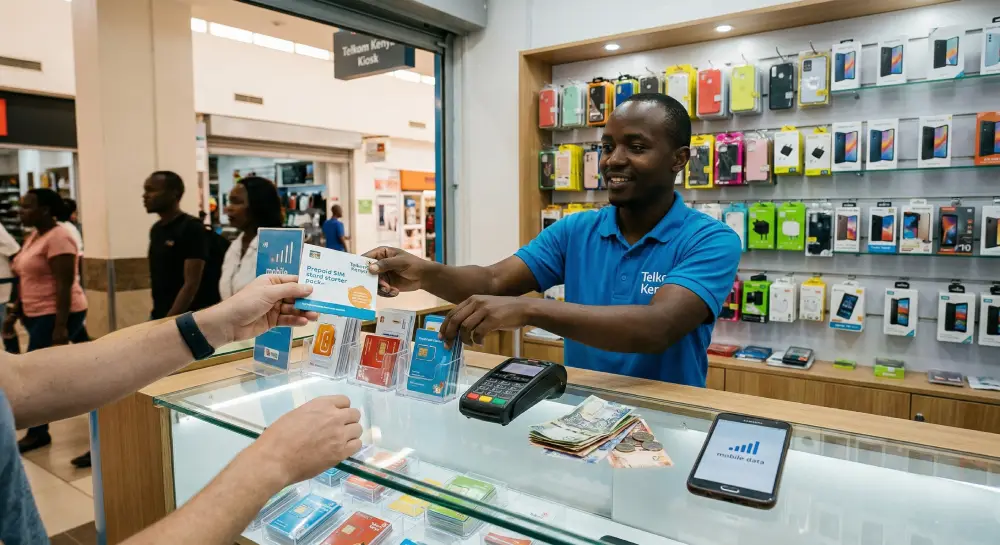
For longer stays (or if you want the lowest local rates), buying a prepaid SIM in Nairobi or Mombasa is usually the best value. City-center operator stores and authorized dealers tend to have more bundle choices than airport counters.
Typical local tourist SIM pricing (2026)
Local “tourist SIM” style offers commonly start around 1,000 KES for a bundle sized for short trips (for example, published February 2026 reference notes 1,000 KES for 7GB valid 30 days for a tourist-oriented offer).
For day-to-day top-ups, you’ll also see very small, affordable daily bundles. For example, March 2026 report notes 4GB for 99 KES (24 hours) and 2GB for 50 KES (valid until midnight) on a popular daily plan.
Because local operators frequently adjust promotions, treat these as a “what’s normal in 2026” range—not a guaranteed universal offer at every shop.
Where to buy in town
-
Official operator stores (most reliable)
-
Large malls and telecom kiosks with proper registration
-
Avoid random street sellers if you can’t confirm the SIM is registered properly in your name
Registration and setup tips
-
Bring your passport and allow time for the registration process.
-
Ask staff to:
-
Activate your data bundle
-
Confirm APN settings if needed
-
Test that data works before you leave
-
-
Save your top-up method:
-
If you’re using mobile money locally, setup becomes easier, but visitors often top up via scratch cards or card payments depending on the shop.
-
Who should choose a local SIM
-
Travelers staying 2–4 weeks
-
Anyone who wants the cheapest KES-per-GB pricing
-
Visitors who don’t have an eSIM-compatible phone
Option 3: The simplest option for most travelers: Kenya eSIM (Roafly)
If your phone supports eSIM, this is usually the cleanest way to get in Kenya in 2026. You can install your eSIM before you travel and activate data when you arrive—no counters, no queues, no SIM swapping.
Need data in Kenya? Get an eSIM!
Choose the perfect data plan for your trip

Manage your eSIM in the app
Install, top up and track data.
Roafly Kenya eSIM is data-only, supports hotspot, and does not require eKYC (ID verification). It connects on a supported local network and starts validity when the eSIM connects to a supported network.
Roafly Kenya eSIM plans (USD)
-
1GB / 7 Days — $7.50
-
3GB / 30 Days — $16.90
-
5GB / 30 Days — $24.90
-
10GB / 30 Days — $39.90
-
20GB / 30 Days — $79.90
How to install Roafly (3 ways)
-
iOS & Android Direct Install (fastest)
-
QR Code (works on most devices)
-
Manual installation (backup option)
Recommended data plan by trip type
-
Weekend in Nairobi (2–4 days): 1GB if you mostly message and map
-
7–10 days (city + safari): 3GB–5GB if you’ll upload photos and use navigation daily
-
2–3 weeks with regular social + video calls: 10GB
-
Remote work, heavy hotspot use, long stays: 20GB
If you’re unsure, pick the plan that matches your “on-the-go” needs and rely on lodge/hotel WiFi for big downloads. If you’ll be posting lots of safari photos and videos, you’ll burn through data faster than you expect.
Common eSIM mistakes to avoid
-
Install the eSIM too late (do it while you still have stable WiFi)
-
Forget to enable the eSIM line for cellular data after landing
-
Don’t panic if it shows “No Service” briefly after touchdown—network selection can take a minute
For a deeper breakdown of choosing the right plan length and data amount, you can also reference the Best eSIM for Kenya guide.
Option 4: Pocket WiFi (portable hotspot) in Kenya
Pocket WiFi is basically a small hotspot device that connects to local networks and shares internet to multiple devices (phones, laptops, tablets). It can be convenient if:
-
You’re traveling as a couple/family and want everyone connected
-
You need to use a laptop regularly
-
You don’t want to manage multiple SIMs
What pocket WiFi typically costs
International rental services often price pocket WiFi per day, and costs vary widely by provider and delivery method. Some rental listings advertise unlimited-data style packages and daily pricing models for Kenya.
A practical alternative is buying a pocket WiFi device locally and inserting a local data SIM. Kenya retailers and operator listings show pocket WiFi devices sold with starter data offers (device + included bundle).
Pocket WiFi pros and cons
Pros
-
Connect multiple devices at
-
Useful for groups and work setups
-
Keeps your phone battery healthier than constant hotspot mode
Cons
-
Another device to charge and carry
-
Daily rentals can get expensive versus eSIM/local SIM
-
Performance still depends on mobile coverage (and safari areas can be patchy)
Option 5: Airport WiFi and public WiFi (good backup, not a full solution)
JKIA (Nairobi airport) WiFi
JKIA provides complimentary WiFi across airport areas, which is useful for messaging, ride-hailing, and quick travel admin right after you land.
Public WiFi in Kenya: what to expect
Hotels and cafés in Nairobi and Mombasa often have WiFi, but speeds and reliability vary. In safari lodges, WiFi is frequently limited to common areas and may be slower or less consistent depending on the location and backhaul method.
WiFi safety basics
-
Avoid logging into banking apps on unknown networks without a VPN
-
Turn off auto-join WiFi on your phone
-
Prefer your own mobile data for anything sensitive
Mobile coverage in Kenya
Safaricom coverage
-
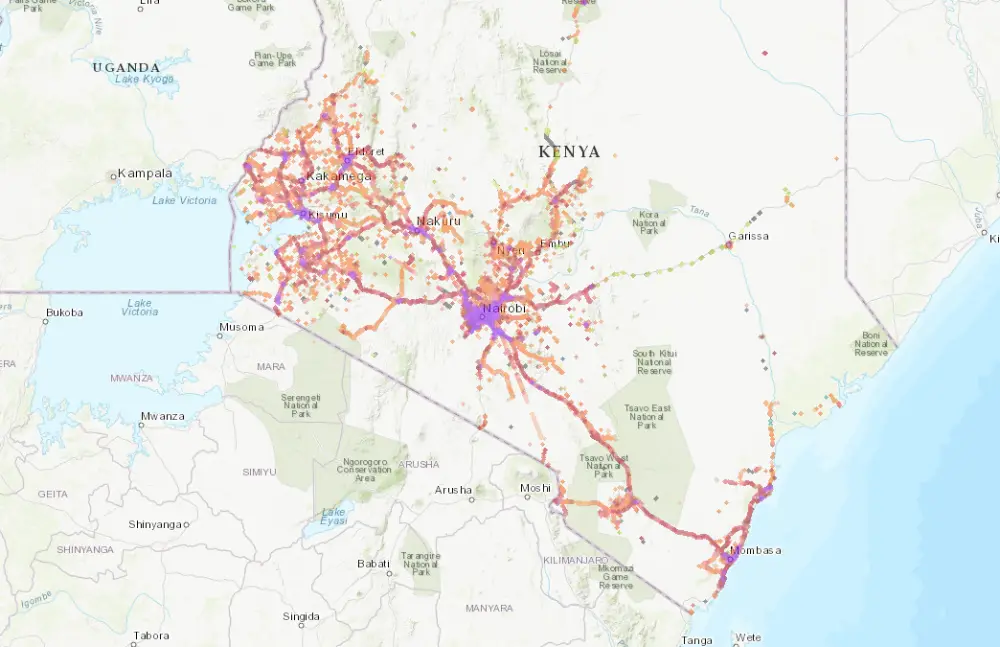
Best overall reach in Kenya, especially outside major cities.
-
Typically strongest along major highways and in populated safari gateway towns.
-
More consistent signal in many rural areas than smaller networks (but still expect gaps deep inside parks).
-
Good choice if your trip includes extensive road travel or remote regions.
Airtel Kenya coverage
-
Strong in big cities and high-traffic corridors (Nairobi, Mombasa, and many major towns).
-
Can be very solid for typical tourist routes and urban travel.
-
Safari areas vary more—often usable around towns/lodges, less reliable in remote stretches.
-
Good choice for city + coast trips and standard tourist circuits.
Telkom Kenya coverage
-
Works well in parts of major cities and some towns.
-
Coverage can be less consistent outside urban centers compared with larger networks.
-
Often better suited as a budget/secondary option rather than a “safari-first” pick.
Safari reality check (any operator)
-
You can have usable signal near lodge areas, park gates, and nearby towns, then lose it on game drives.
-
Plan for intermittent service: download offline maps, save bookings offline, and keep a backup way to contact your driver/guide.
-
Lodge WiFi quality varies widely—don’t assume it will handle calls or large uploads.
A practical setup plan
If you want the smoothest arrival
-
Install a Kenya eSIM before you fly (while you have stable WiFi).
-
Land, turn on the eSIM line, and you’re connected.
If you prefer a physical SIM
-
Use JKIA WiFi briefly for messages and ride pickup.
-
If you need immediate data, buy a SIM at the airport counters in Terminal 1A.
-
If you want the best local value, wait and buy a prepaid SIM at an official store in town.
If you’re a group or working from a laptop daily
-
Consider pocket WiFi, or use a phone hotspot with a larger data plan (either local SIM or a higher-GB eSIM).
Final tip: match your internet choice to your itinerary
If your Kenya trip includes remote parks and long drives, prioritize convenience and reliability over hunting for the absolute cheapest bundle. For most travelers in 2026, an eSIM is the easiest way to land connected, then you can decide later if you need a local SIM or a pocket WiFi setup for heavier usage.
Check the latest eSIM packages for Kenya and install before departure for the smoothest arrival.